
Amatrol’s Basic Pneumatics Learning System – Double-Sided A-Frame Bench (850-PD1) features the Basic Pneumatics Learning System (85-BP) panels mounted on a sturdy, durable A-frame bench with plenty of room for expansion.
Taking Higher Education to the Next Level
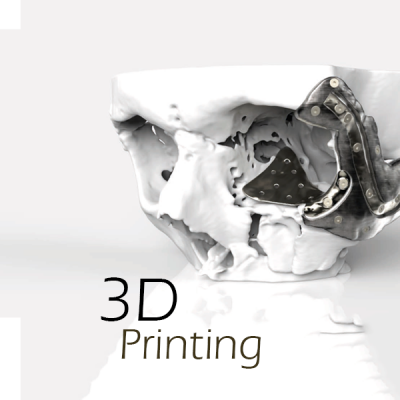
3D Printing Solutions for Education & Research
Colleges and universities with 3D printing technology can prepare students for a workforce that demands sharp critical thinking and collaboration skills. The right technology attracts not only bright students but also talented faculty and valuable industry partners, leading to valuable business partnerships that can give undergrads vital real-world experience.
Tomorrow’s engineers, designers, and problem-solvers deserve every tool available to build a brilliant future. 3D printing fuels limitless creativity when students get to see, hold and test their ideas in real space. For researchers, 3D Printing breaks barriers with unmatched material capabilities, including impressive detail, precision and durability.
Solutions Center
To learn how 3D technology empowers schools, universities and laboratories, or to try cutting-edge learning tools hands-on, schedule a visit to our Solutions Center or request a sample part today!
Tech-Labs offers a wide range of 3D scanners to fit your needs and budget. Our 3D scanners range from portable handheld scanners to a system of multiple scanners that work together to scan larger objects faster and more accurately.
A 3D scanner is a device that analyzes a real-world object or environment to collect data on its shape and possibly its appearance (i.e. color and texture). The collected data can then be used to construct digital three-dimensional models.
Many different technologies can be used to build these 3D-scanning portable devices; each technology comes with its own limitations, advantages, and costs. Many limitations in the kind of objects that can be digitized are still present, for example, optical technologies encounter many difficulties with shiny, mirroring, or transparent objects. For example, industrial computed tomography scanning can be used to construct digital 3D models, applying non-destructive testing.
Collected 3D data is useful for a wide variety of applications. These devices are used extensively by the entertainment industry in the production of movies and video games. Other common applications of this technology include industrial design, orthotics and prosthetics, reverse engineering and prototyping, quality control/inspection and documentation of cultural artifacts.
Amatrol delivers total learning solutions for Advanced Manufacturing Training!
Tech-Labs offers technical training equipment and curriculum from Amatrol’s Advanced Manufacturing program. Amatrol’s industry-leading equipment and curriculum are developed in partnership with industry to deliver job-ready, industry-relevant skills. Working closely with companies like Caterpillar, Tropicana, and many others Amatrol has designed equipment for workplace success.
Key Features
- Highly Demanded Industry Skills: Hands-On, Job-Ready
- Individualized Self-Paced or Group Learning Flexibility
- Extensive Curriculum Spanning Basics Through Advanced
- Authentic Industrial Troubleshooting
- Durable, Industrial Equipment Designed for Effective Teaching
- Superior Multimedia Interactivity Connects With Learners
- eAssessment to Accelerate Learning, Improve Effectiveness
- Learning Anywhere, Anytime – 24 x 7
- Outstanding Support
- Computer Based Training (CBT) with Amatrol’s eAssessment (available via the web)
As FANUC America's exclusive Education Authorized Reseller in Texas and Oklahoma, we provide our customers with high-quality CNC and Robotics learning systems. As the leading CNC and Robot manufacturer with the most extensive installed base, students will most likely use FANUC CNCs or Robots when entering the workforce.
There is a growing need for skilled workers competent in the setup, programming, and operation of CNCs. Since more manufacturers trust their operations to FANUC CNCs than any other control platform, students and workers must become FANUC CNC certified.
FANUC’s Certified Education Robot Training system sets the industrial robot certification training standard. As the number one supplier of intelligent robots, more FANUC robots are working in manufacturing and industrial facilities than any other brand. The FANUC Robots Certified Education Robot Training Cell is extremely valuable to trade schools, high schools, community colleges, and engineering schools.
We offer a line of training systems for Advanced Manufacturing from Amatrol, including equipment specifically designed to teach hydraulics and pneumatics.
Tech-Labs is proud to offer equipment and curriculum from Amatrol’s Advanced Manufacturing program. Amatrol’s industry-leading equipment and curriculum is developed in partnership with industry to deliver job-ready, industry-relevant skills. Working closely with companies like Caterpillar, Tropicana, and many others Amatrol has designed equipment for workplace success.
Tech-Labs offers a wide range of training products designed to keep pace with the world of Advanced Manufacturing. From Hydraulics to Process Control to CNC there is a program for any application.
Tech-Labs offers technical training equipment and curriculum from Amatrol’s Advanced Manufacturing line. Amatrol’s motor control trainers and curriculum is developed to deliver job-ready, industry-relevant motor control skills.
Advanced Manufacturing Skills For Workplace Success!
Amatrol’s mechanical training systems are the best in the industry. Our learning programs are developed in partnership with industry and education to ensure that the skills are on target to support modern industry needs. We off a wide variety of Amatrol training systems to meet the many diverse demands in mechanical training. Our learning programs are equally effective for technicians, engineers, production workers, and anyone needing further understanding and skills in mechanical systems.Process control is a versatile and vital part of major industries, including power generation; petrochemicals; food processing and bottling; chemical manufacturing; biotechnology; pharmaceuticals; and refineries.
Because of the wide application of this key component, Amatrol has developed the largest and most in-depth offering of industrial process control training options available. Amatrol offers four major process control trainers, each covering a different process control application: level and flow, temperature, analytical, and pressure. Amatrol also offers a variety of training options for related process control applications such as HART communication protocol, Foundation Fieldbus, and SCADA.
Motion control is used where conventional motor control, using discrete inputs and outputs, cannot achieve the accuracy needed to produce a product. This applies to a wide range of industries that need to meet market demands for greater system throughput and improved output quality and precision. Some of these industries include automotive, energy, medical, petroleum, printing, and packaging. A good example of motion control is an offset printing press that uses four motors to print four separate colors on a page and another motor to turn the feed roll. A motion controller sends acceleration and velocity commands to each motor to control its speed, torque, and rotor position. At the same time the motion controller monitors these parameters and adjusts the output as needed to create a legible color image on the page.
Pages
-
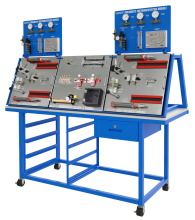 Item Number:850-PD1
 -
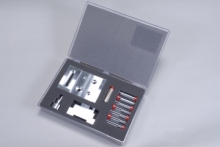 Item Number:803-101DAC Worldwide’s Basic Precision Measurement Kit 1 (803-101) covers valuable industrial quality assurance skills using precision rules, dial calipers, micrometers, and other common precision measurement tools and instruments. Learners will use locally-available precision measurement tools to practice fundamental measurement techniques and tools used in industry.
 -
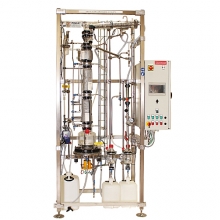 Item Number:DVI/3000Pignat's standard-size, floor-standing Batch Continuous Distillation trainer (DVI/3000) allows students to operate both a continuous and batch distillation process.
 -
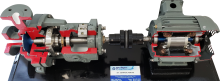 This equipment is either cut-a-way or has a horizontally split case so you can see the internal components. They may be taken apart and reassembled for training purposes. Models shown are representative of typical production items. Actual equipment may vary according to manufacturer and design or customer specifications. Please call for us for any custom requirements.
 -
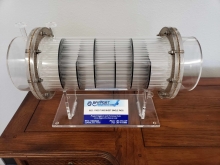 Bayport Technical’s models are detailed, to-scale models that depict various industrial machines. The industrial models, which are loosely based on common equipment by popular industry leaders, include all primary features and components.
 -
 Item Number:140-GLPT | 142-3PS | 142-CT2 | 142-FRTOil & Gas training aids include a Gas Lift Process trainer & working demonstrators covering 3-Phase Separators, Cooling Towers, and Floating Roof Tanks.
 -
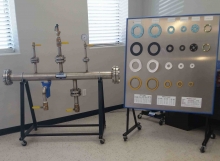 Bayport Technical’s trainers are hands-on training systems designed to give students real-world experience working on equipment they will encounter first-hand on the job. Each trainer has the look and feel of real industrial equipment, build with full-sized, industrial-quality components that will stand up to repeated use.
 -
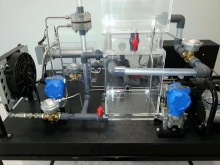 Bayport Technical's Working Demonstrators offer realistic, first-hand visualization into the inner workings of industrial components and structures. From cooling towers and distillation towers to storage wells and charcoal filters, Bayport's Working Dissectibles offer incredible educational and training aids.
 -
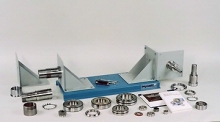 Item Number:204-000DAC Worldwide’s Bearing Maintenance Training System (204-000) is a heavy-duty learning package that allows for in-depth training in the identification, installation, and removal of a variety of industrial-quality rolling element bearings.
 -
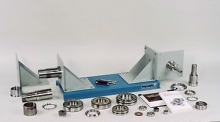 Item Number:204-PACDAC Worldwide’s Bearing Maintenance Training System Plus (204E-PAC) is a heavy-duty learning package that allows for in-depth training in the identification, installation, and removal of a variety of industrial-quality rolling element bearings.