

Bayport Technical's Lockout Tagout Training System, Single Block & Bleed (150-LOTO1B), was designed to provide hands-on safety training for a wide variety of common process activities, both mechanical and electrical.
Transportation, Distribution & Logistics Career Pathway focuses on careers in planning, management, and movement of people, materials, and goods by road, pipeline, air, rail and water and related professional support services such as transportation infrastructure planning and management, logistics services, mobile equipment, and facility maintenance.
Career Cluster Pathways
- Transportation Operations
- Logistics Planning and Management Services
- Warehousing and Distribution Center Operations
- Facility and Mobile Equipment Maintenance
- Transportation Systems/Infrastructure Planning, Management, and Regulation
- Health, Safety and Environmental Management
- Sales and Service
Tech-Labs represents multiple product lines as a regional dealer for the states of Texas and Oklahoma. Tech-Labs supports the following industry-recognized certifications by providing technical training systems, curricula, and software.
Industry 4.0 is changing the way work is done, not just in manufacturing. All industries and jobs will be affected by connected technologies. It’s imperative for college students to learn Industry 4.0 so they can succeed in a workforce where these systems are becoming the norm.
When students are engaged, they are better able to discover their talents and develop the mental resources they need to think critically. But maintaining engagement can be a challenge, especially in middle school when both data and teacher experience point to a decline in student motivation.

World Leader in Technical Training Solutions
DAC Worldwide has been helping maintenance departments, training professionals, vocational educators, and workforce development specialists with realistic, hands-on training systems for over 35 years.
Whatever your industrial training needs, they have a wide range of products to help. For teaching fundamentals and troubleshooting, their cutaways provide a better understanding of how components actually work. The dissectibles teach essential hands-on skills for disassembly and assembly. The models allow you to explain how the various components of a system work together to create an entire process.
DAC Worldwide’s training systems provide a realistic, hands-on learning experience. Each system has the look and feel of real equipment students may encounter during their careers. These training systems are built with full-size, industrial-quality components and high-durability, powder-coated surfaces throughout to allow for repeated use and rough handling.
Technical Topics
Electrical/Electronics Heat Transfer & Steam Mechanical Drives Process Control & Instrumentation Pumps, Compressors & ValvesThis is DAC WORLDWIDE, your premium resource for industrial training & assessment solutions.
DAC Worldwide's line of industrial cutaways are real-world industrial components that have been restored, cutaway, and refinished using durable urethane coatings.
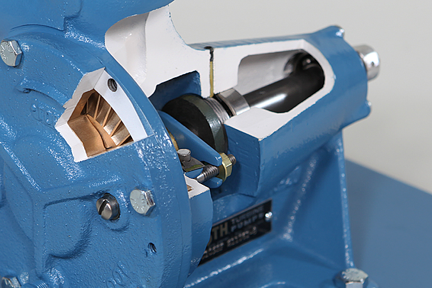
Successful training must match real-world conditions as closely as possible. DAC's line of industrial cutaways are real-world industrial components that have been restored, cutaway, and refinished using durable urethane coatings. Each of these industrial components has been professionally sectioned to expose each device’s primary components.
On many of DAC Worldwide’s cutaways, functionality has been retained and a hand wheel is provided to demonstrate low-speed manual operation. Each cutaway is mounted on a modular, heavy-gauge steel baseplate and support assembly. For industrial training relevance, common models by well-known manufacturers are chosen.
Features
- Hands-On Experience with Real Industrial Components
- Professionally-Sectioned To Expose Key Internal Components
- Functionality Retained Wherever Possible To Allow Observation of Low-Speed Manual Operation
- Common Models by Popular Manufacturers Chosen for Industrial Training Relevance
Technical Topics
HVAC Cutaways Heat Transfer & Steam Electrical/Electronics Fluid Power Mechanical Drives Oil Production Process Control & Instrumentation Pumps, Compressors & ValvesDAC Worldwide’s models are detailed, to-scale models that depict various industrial machines across numerous sectors.
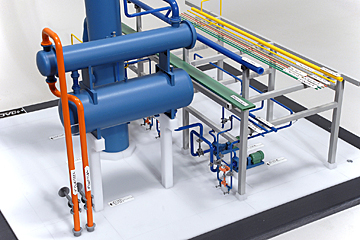 The industrial models, which are loosely based on common equipment by industry leaders, include all primary features and components. The primary housing and secondary components are sectioned off into cutaways, allowing for easy viewing of internal components while visualizing assembly and disassembly procedures.
The life-like industrial models are a convenient size and offer stunning realistic detail and color-coded flow paths, which will help prepare learners for rewarding industrial careers, such as maintenance technicians, machines operators, and more!
DAC Worldwide offers models in a variety of industrial disciplines.
Pages
-
 Item Number:150-LOTO1B
 -
 The primary goal of this course is to teach workers safe work procedures while performing work activities around electrical areas.
 -
 Locktronics from Matrix TSL is a hands-on electrical and electronics training system that enables students to build real working circuits while learning electrical, automotive, aerospace, and installation fundamentals.
 -
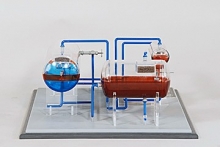 Item Number:295-110The model features exact, "to-scale" construction throughout. Modeled components include a liquid knockout drum, heat exchangers, choke, separators, and connecting piping, as well as representative concrete foundations and equipment supports.
 -
 Item Number:EMT 4Train future electricians with the EMT 4 Electric Vehicle Charging Station Trainer by Lucas-Nuelle. Portable, smart, and practical — ideal for hands-on electrical vehicle equipment (EVSE) training.
 -
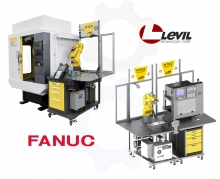 Item Number:MTECThe APT MTEC is a FANUC Certified, advanced manufacturing, CNC Load/Unload system; complete with curriculum and training for your students to integrate and program a CNC and Robot.
 -
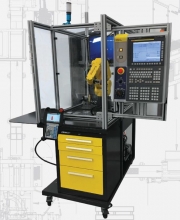 Item Number:MTEC-SIMThis machine comes ready for mill and lathe operation with the robot moving a blank from a pick location to a simulated mill vice or lathe chuck all in one compact cell. The student can see the machine tool come to life on the monitor, hear the tools cutting, and crash the machine (virtually).
 -
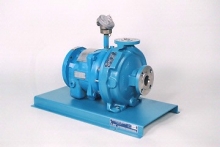 Item Number:275-150DAC's Magnetic Drive Centrifugal Pump Dissectible (Goulds/IR/Durco/Flowserve) (275-150) is an industrial pump for training relating to process pumps.
 -
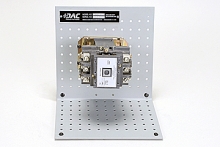 Item Number:273-910DAC Worldwide’s Magnetic Motor Starter Cutaway (273-910) depicts a professionally-crafted, sectioned example of a commonly encountered 3-phase magnetic motor starter used in industrial and commercial electrical systems to control high horsepower AC induction motors, lighting systems, and other non-inductive loads.
 -
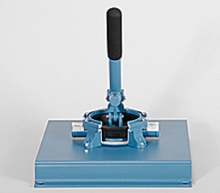 Item Number:278-181DAC Worldwide’s Manual Diaphragm Pump Cutaway (278-181) depicts a sectioned hand-operated diaphragm-type positive displacement pump that allows for convenient classroom training in the design, operation, construction, and maintenance of this common pump type used in industrial, marine, commercial, and agricultural applications for pumping liquids by hand.